
Den här artikeln finns även på:
 Svenska
If you have a credit stored with us, e.g. after a double payment or paying a cancelled invoice, you can use it to pay other invoices. This guide detauls how to see your current credit balance and how to use it as payment on invoices (in part or in full).
Check credit balance
To check how much credit you have in your client account with us, do the following:
- Begin by logging on to the Client Area.
- Click
My AccountunderAccountin the menu to the left.
- Now, click the tab
Credit.
- You’ll now see your current credit balance.
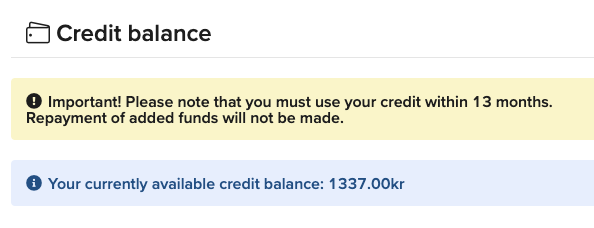
Use credit to pay an invoice
To use the credit balance to pay an invoice, follow these steps:
- Begin by logging on to the Client Area.
- Click
InvoicesunderAccountin the menu to the left.
- Click
Viewto the right of the invoice you wish to pay using your credit balance.
- You will now access the invoice. Scroll down a bit, and you’ll see a box where you can pay the invoice using your credit balance. Select the amount you wish to deduct from your available credit balance and click
Apply Credits.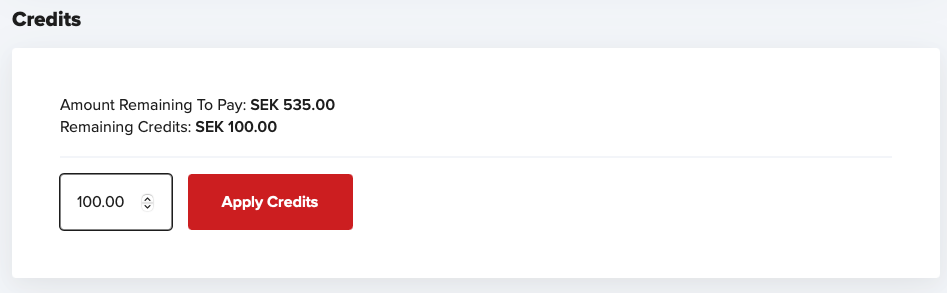
- If your existing credit does not fully cover the invoice, you can settle the remaining balance via any of our other payment options. The outstanding amount is shown in the
Summarysection, located further up on the invoice page.
